Image Processing
bim automatically processes images for optimal web delivery.
Source Directory
Place images in the images/ directory:
images/
  photo.jpg
  diagrams/
    architecture.png
  screenshots/
    app.webp
Processing Steps
- Load the image
- Strip EXIF metadata (privacy)
- Resize to maximum dimensions
- Re-encode with target quality
Default Settings
| Setting | Default |
|---|---|
| Max width | 1920px |
| Max height | 1080px |
| JPEG quality | 85% |
Supported Formats
Raster images that get processed:
- JPEG (.jpg, .jpeg)
- PNG (.png)
- WebP (.webp)
- GIF (.gif)
- BMP (.bmp)
SVG and Vector Images
SVG files are not processed through the image pipeline (they're already optimized vectors). Place them in static/images/ instead:
static/
  images/
    logo.svg
    diagrams/
      architecture.svg
They'll be copied to /images/ in output, same as processed images.
Using Images
Reference images in Markdown:
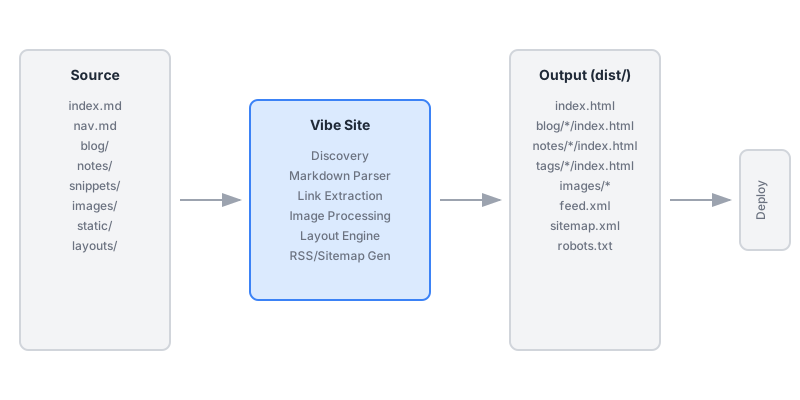
Images are served from /images/... in output.
Example Images
Here are some images from this site:
Logo

Architecture Diagram

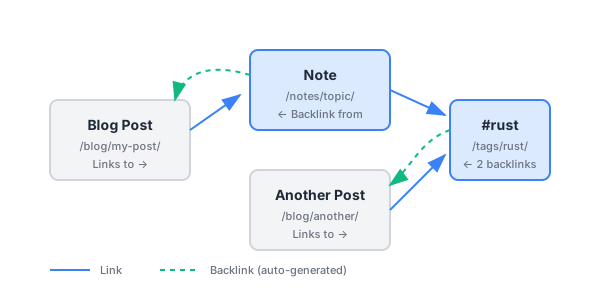
Backlinks Visualization
Standalone Processing
Process images without a full build:
bim prep-images
bim prep-images --force  # Reprocess all
Caching
Unchanged images are skipped during rebuild. Use --force to reprocess everything.
Related: #images #optimization @documentation