How bim Works
A visual guide to bim's architecture and processing pipeline.
The Big Picture
bim transforms your Markdown content into a static website. Here's how it works:
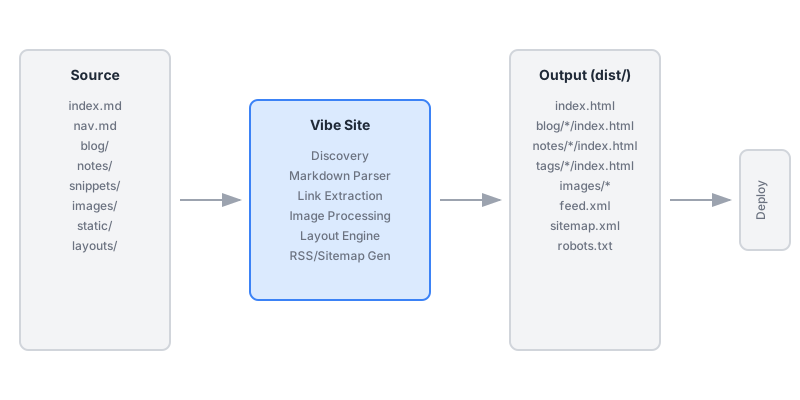
Processing Pipeline
- Discovery - Scan the source directory for content
- Parsing - Convert Markdown to HTML, extract metadata
- Linking - Build the backlink graph
- Rendering - Apply layouts to generate final HTML
- Output - Write files to the output directory
Backlinks in Action
One of bim's key features is automatic backlinks. When you link from one page to another, the target page shows a backlink back to the source:
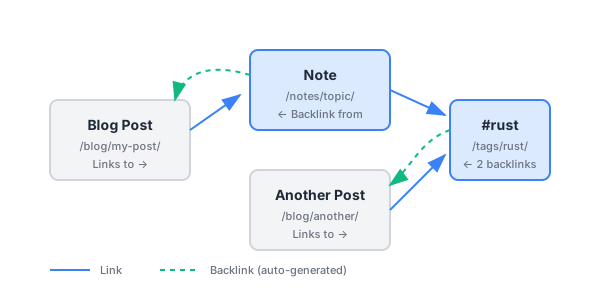
This creates a bidirectional web of connections—essential for @digital-garden style sites.
No Configuration Required
Notice there's no configuration file in the pipeline. bim uses:
- Filesystem structure for organization
- Filename prefixes for dates
- Git history for modification times
- First H1 for page titles
This "convention over configuration" approach means you can focus on writing, not configuring.
What Gets Generated
For a typical site, bim generates:
| Input | Output |
|---|---|
index.md | /index.html |
blog/2024-01-01-post.md | /blog/post/index.html |
notes/topic/subtopic.md | /notes/topic/subtopic/index.html |
snippets/code.rs | /snippets/code/index.html |
Images in images/ | Optimized images in /images/ |
Files in static/ | Copied to root |
| - | /feed.xml (RSS) |
| - | /sitemap.xml |
Try It Yourself
# Clone a starter
git clone https://github.com/example/bim-starter

# Build and serve
cd bim-starter
bim serve --watch
Related: #architecture #bim #static-site-generator @documentation